The button that did nothing
Aug 7, 2026 · 7min
Most of my users lived on a phone. I built the whole thing on a laptop. Here's what that cost, and the rule I keep now.
You've met a dead button. The crosswalk one that isn't wired to anything. The elevator "close door" that's decoration. The one you press, and when nothing happens you press it again, harder, because surely it heard you the first time. There's a particular small humiliation in it, standing there jabbing a button while the world declines to respond.
I built one of those. Not for me. For most of the people who showed up.
The recording I couldn't stop watching
We shipped a little thing on BethelFlow called My Pastor Once Said. You type a line your pastor never stopped saying, add a photo, and it makes a shareable card. Simple, joyful, exactly the kind of thing that's supposed to just work. I wrote about designing the whole campaign separately. This post is about the part that broke.
Then I opened a session replay one morning. An iPhone. Mobile Safari. Someone had made their card. It was right there on the screen, finished, theirs. Then they tapped Download. Nothing. They tapped it again. Again. I counted later: twenty times over eight minutes. Then they tried WhatsApp twice, then they left. No card ever reached them.
I watched it the way you watch someone wave at a sliding door that isn't going to open. And the worst part is that on my machine, a desktop running Chrome, I had pressed that exact button a hundred times and it worked every single time. It worked in the only place I ever tested it.
Three different silences
When I finally pulled the button apart, it wasn't broken in one way. It was quietly broken in three, and each one was invisible from where I sat.
One: iOS doesn't honour the download trick. The pattern every tutorial teaches is simple: make an anchor, set download, click it in code. Safari on iOS simply ignores it. And my click landed after an await while the image rendered, so the user's tap was already spent by the time the download tried to fire.
const dataUrl = await renderCardDataUrl(cardRef.current) // the tap is gone by here
saveDataUrl(dataUrl, filename)                           // iOS: politely does nothing
On desktop this saves a file. On a phone it's a dead button. Same code, opposite outcome, and I only ever stood on the side where it worked.
Two: the failure underneath, that hit everyone. Our security headers set connect-src 'self' https: wss:. Reasonable. But building the image meant turning a data URL into a blob, and I'd done it the lazy way, fetch(dataUrl). fetch answers to connect-src. So the browser blocked me from fetching my own image, the call threw, and the file was never built. Not just on iOS. Everywhere. iOS just failed more loudly because it had no fallback to limp to.
The fix was to stop asking the network for something I already held in my hand, and decode the base64 myself:
// was: const blob = await fetch(dataUrl).then(r => r.blob())  // CSP blocks this
const [head, body] = dataUrl.split(",", 2)
const bytes = Uint8Array.from(atob(body), c => c.charCodeAt(0))
const blob = new Blob([bytes], { type: "image/png" })
Three: the button, hammered. To feel snappy, I'd pre-warmed the share on hover. But on every failure it reset and tried again on the next pointer event. So a person poking a dead button didn't just get silence. They fired off eleven, fifteen failed requests into the dark, and not one of them made a sound I could hear.
The colour that never came
There was a quieter one still. On this card, the photo is the colour. Without it you get a flat gradient. iPhones shoot photos as HEIC, and an <img> renders HEIC on Safari and almost nowhere else. So a card built and shared from a phone, opened by a friend on Chrome, lost its photo entirely. And the handler I'd written to be "safe" made sure no one ever knew:
<img src={imageUrl} onError={(e) => { e.currentTarget.style.display = "none" }} />
Hide the broken image. No error, no log, just a colourless card where a face should be. I've written before about silence wearing the costume of safety. Here it was again, in a different disguise. The fix was to stop trusting whatever the phone handed me and re-encode every upload to a plain JPEG the moment it's picked. And if it genuinely can't be decoded, to say so instead of swallowing it.
The number I hadn't looked at
Fixing the button felt like the work. It wasn't. The work was the number I'd never bothered to open: who was actually here.
On mobile, 148 people landed and 26 made a card. An 18% finish. On desktop, 42 landed and 17 made a card. Forty percent. Seventy-eight percent of everyone who came was on a phone, and on a phone they finished at less than half the rate they did on a desktop. I had poured the entire build into the 22% I could see. Not out of some decision, but because my machine happened to be one of them, and a laptop never once felt the dead button.
Building where your users live
So we rebuilt the create flow for a thumb, not a mouse. One screen instead of three. The card previewing live as you type, so the payoff arrives while you're still working instead of two taps later. "Take a photo" wired straight to the camera.
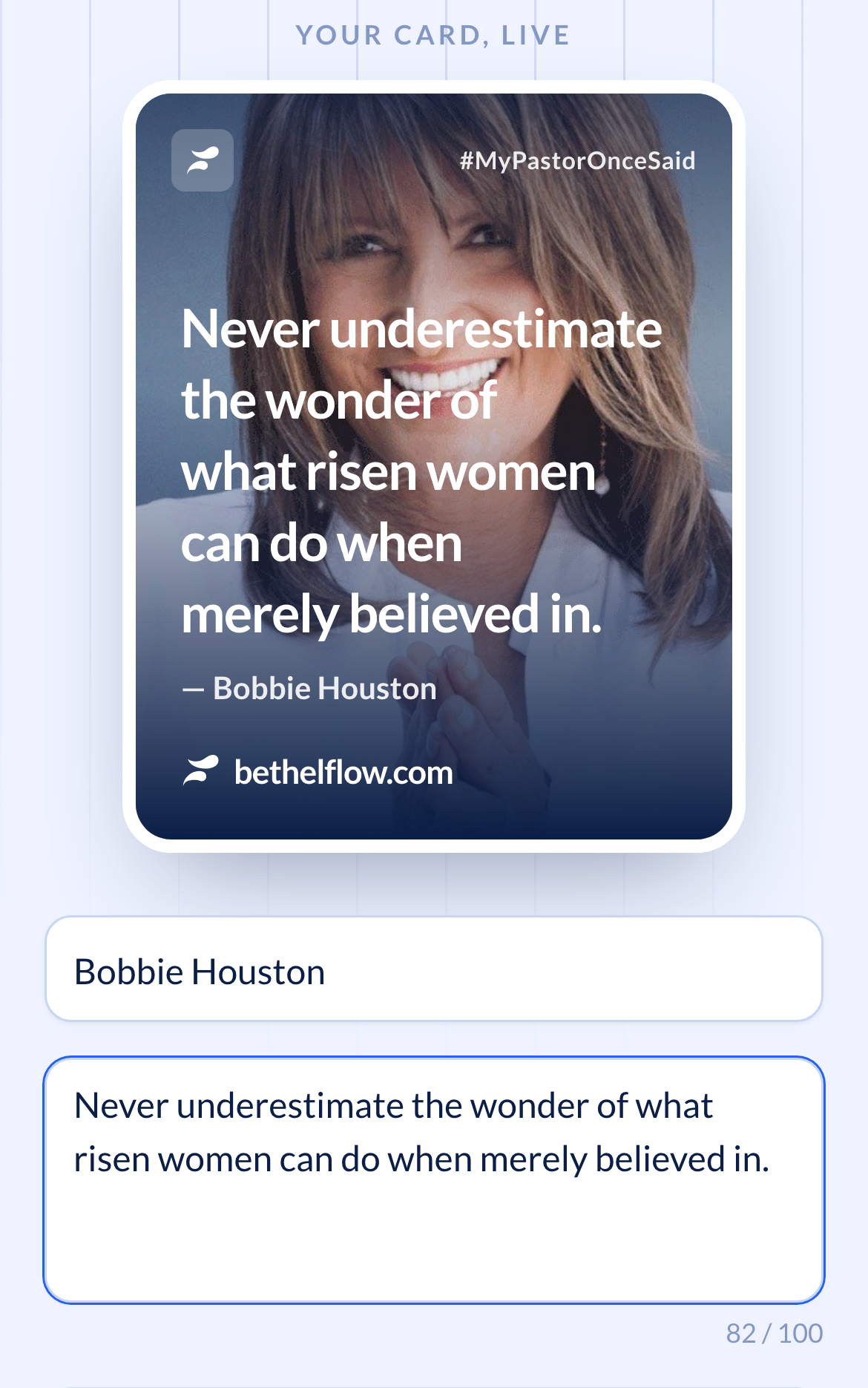
And the part I'd change first if I could do it all again: we stopped pretending to be the platform. Instead of hand-rolling a download the phone doesn't understand, we hand the finished card to the phone's own share sheet. The one button iOS actually knows how to press.
if (navigator.canShare?.({ files: [file] })) {
  await navigator.share({ files: [file], title, text })
}
One line, and suddenly the button presses back. Save to Photos, WhatsApp, wherever. All the things the person was reaching for in the first place, through the door their phone already knew how to open.

Make the silence loud
Then we did the unglamorous thing: we made failure audible. Every failed share now carries its reason with it, so the next time something goes quiet I don't have to get lucky with a replay to find out.
Because the real bug was never the anchor tag or the header. Those were an afternoon. The real bug was that a person stood there tapping twenty times and the only reason I ever knew was that I happened to scrub through a recording weeks later. A dead button is bad. A dead button you can't see is how you quietly lose three-quarters of the people who came.
The rule I keep
Build on the device most of your users are actually holding, not the one you happen to own. And instrument every failure so it can't hide. The gap between a bug and a disaster is almost always just whether the button can tell you it's dead.
The card generator works on a phone now. If you've got a line your pastor never stopped saying, go make one at My Pastor Once Said. Press the button. It should press back.